A Movie Tracker That Lives in Discord: Movie Night Bot Setup Guide

Your Discord server already argues about what to watch. Now the movie tracker can sit in on the argument: polls, a scheduled movie night with the poster on it, where it streams, and a rating card afterwards that saves straight to your profile.
Every movie night server knows the routine. Someone asks what we are watching. Twelve people suggest fourteen movies. Somebody finds out it left Netflix last week. By the time the group agrees, half of them have gone to bed.
Social Entertainment now works inside Discord. Five slash commands handle the parts of movie night that usually eat the evening: picking, scheduling, checking where it streams and talking about it afterwards. Then the part I am most excited about: when you rate a movie in Discord, that rating lands on your Social Entertainment profile. Same stars, same history, no copying anything across.
That two-way link is rare. Letterboxd, Trakt and Serializd do not have official Discord bots. The ones you can find are built by fans and mostly post your diary entries into a channel, one way, every few minutes. This one comes from the app itself, so Discord and your profile stay in step.
What the Discord bot does
- /title: look up any movie or show. You get the poster, runtime (or number of seasons), genres, the Social Entertainment community rating, the TMDB score, and where it streams, rents or sells in your region. 25 regions are built in, from the US and UK to Brazil, Japan and South Africa.
- /pick: start a real Discord poll with 2 to 10 titles. It stays open for 2 hours by default, or anything up to a week.
- /movienight: turn the winner into a Discord server event, with the movie's artwork as the cover image and where to watch it in the description. Everyone taps Interested and Discord sends the reminders.
- /recap: post a "how was it?" card with 1 to 5 star buttons. The card keeps a running average for the whole server, and if your account is linked, your tap is saved as a real rating in the app.
- /link: connect your Discord account to Social Entertainment, so /recap ratings count on your profile.
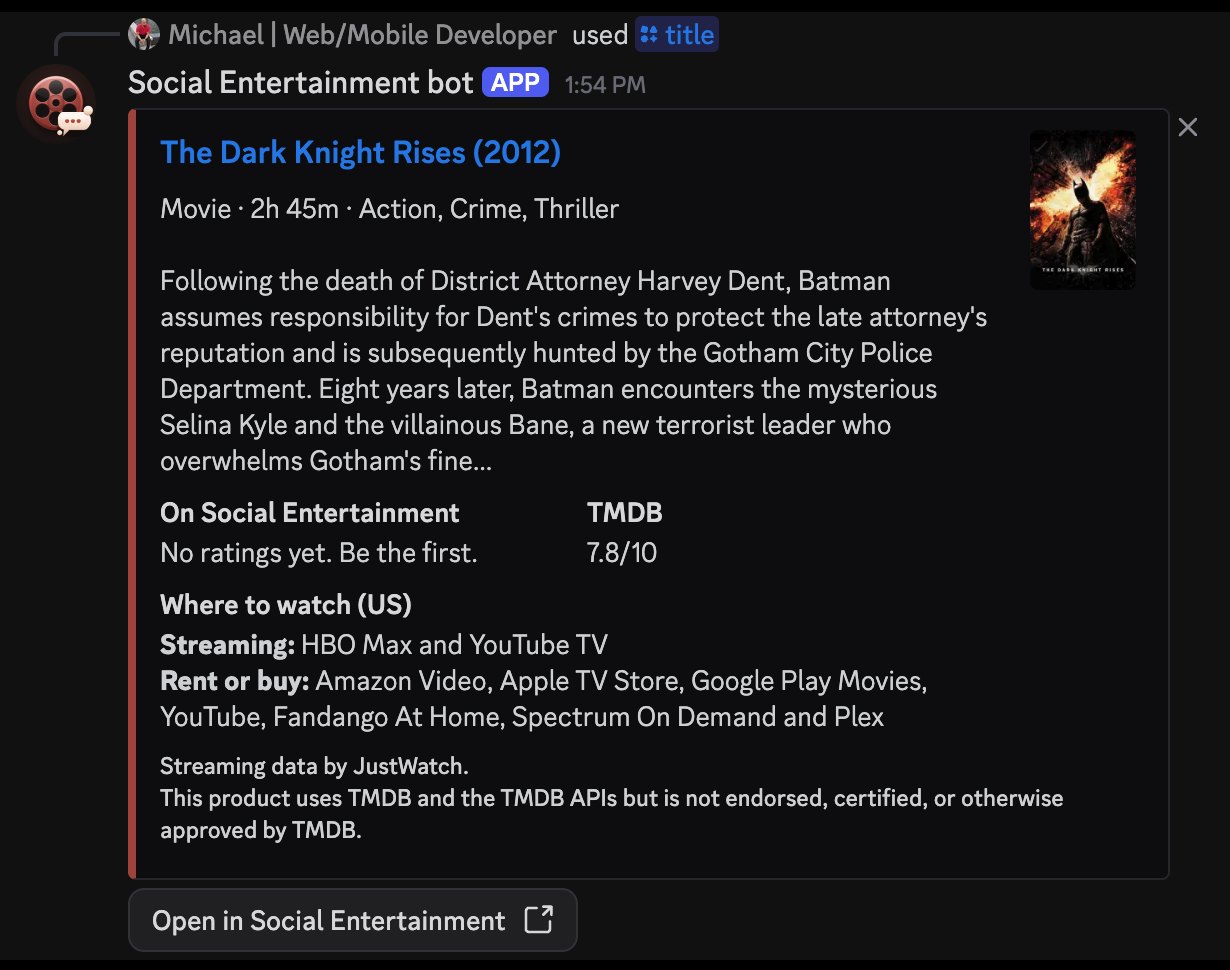
Every card has an Open in Social Entertainment button that takes you to the title's page in the app, where the trailer, cast, reviews and episode threads live. No more "which service is it on again?" halfway through the evening: the answer is in the card before anyone asks.
Two ways to add it: your account or your server
Discord lets an app be added in two places, and this one supports both. Most people only need the first.
- Add it to your account: the commands follow you into every server you are in, plus DMs and group chats. No admin needed. This gives you /title, /pick, /recap and /link.
- Add it to a server: the bot joins the server itself. This is what /movienight needs, because creating a server event takes the bot's own permissions. You need the Manage Server permission to do this, so it is usually the server owner or a mod.
One thing worth knowing: if a server has turned off Use External Apps for members, replies from account-added commands only show up for the person who ran them. If your /pick poll is invisible to everyone else, that setting is why, and adding the bot to the server fixes it.
Setup, step by step (about 2 minutes)
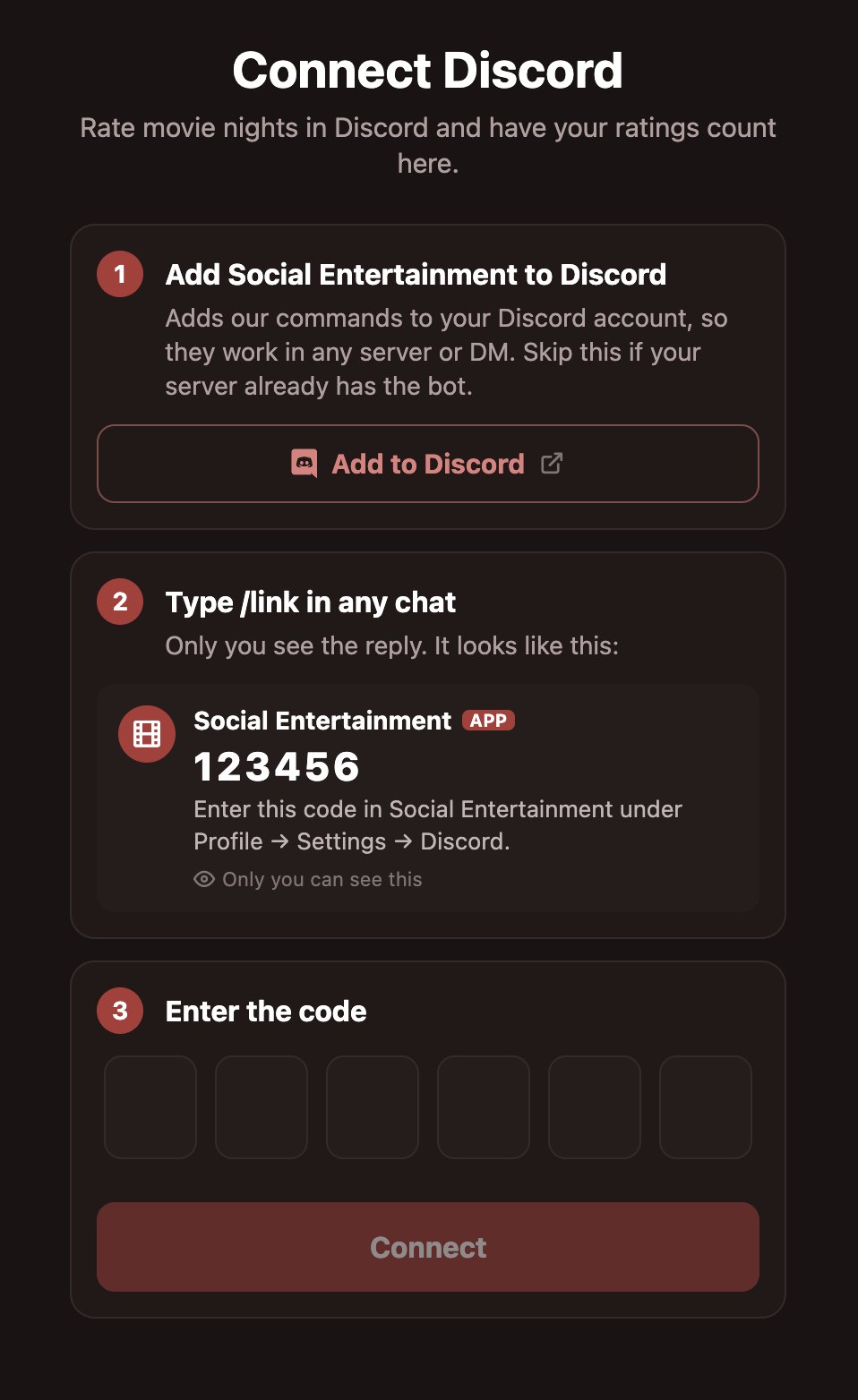
Three steps: add the app, ask Discord for a code, type the code into Social Entertainment. Step 1 alone is enough to start using the commands; steps 2 and 3 make your ratings count on your profile.
Step 1: Add Social Entertainment to Discord
Open this Add to Discord link. Discord shows the app and what it can do; tap Authorize. That is the whole install, and it costs nothing.
Running a server and want /movienight? Use the Add to Server link instead, pick your server from the list and approve the permissions. The bot asks only for what the commands use: send messages and links, create polls, and create and manage events.
Step 2: Type /link in any Discord chat
In any server or DM, type /link and press enter. The reply is a 6-digit code that only you can see. Nobody else in the channel sees it, so it is safe to do this in a busy server. The code lasts 10 minutes. If it runs out, run /link again for a fresh one.
You can skip linking entirely and still use every command. Linking only matters for one thing: making your /recap stars count on your profile.
Step 3: Enter the code in Social Entertainment
Sign in to Social Entertainment, open your Profile, then Settings. Near the bottom, under Connected accounts, tap Discord. Right now that screen is on the web at socialentertainment.app/discord. It arrives in the iPhone and Android apps with their next update.
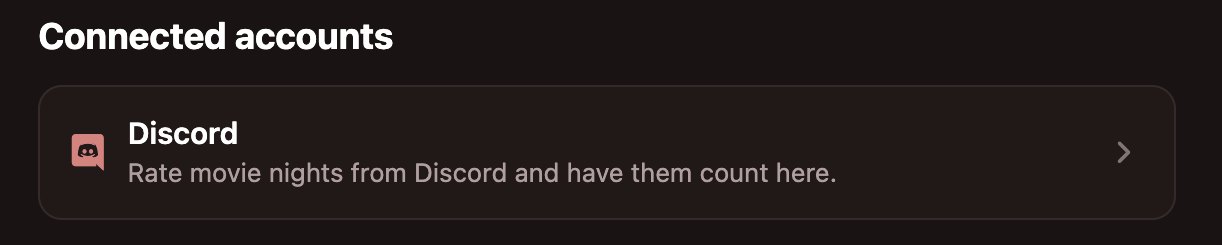
The Connect Discord screen walks through the same three steps. Type the 6 digits into the boxes and it connects on the last digit. That is it: you are linked.
Once you are linked, the screen swaps to a short list of commands to try next:
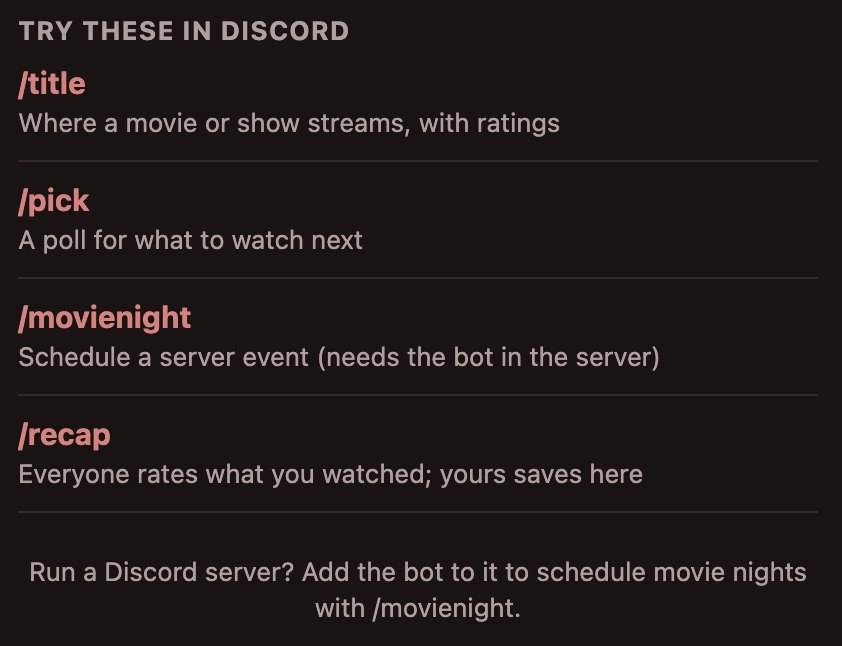
Changed your mind? The same screen has a Disconnect Discord button. Ratings you already saved stay on your profile; new taps on recap cards just stop saving.
Your first movie night, start to finish
Here is how a week goes with the bot in the server, with screenshots from our own test server along the way. Your shortlist might be a whodunit triple bill (Knives Out, Glass Onion, Wake Up Dead Man); ours was three superhero shows.
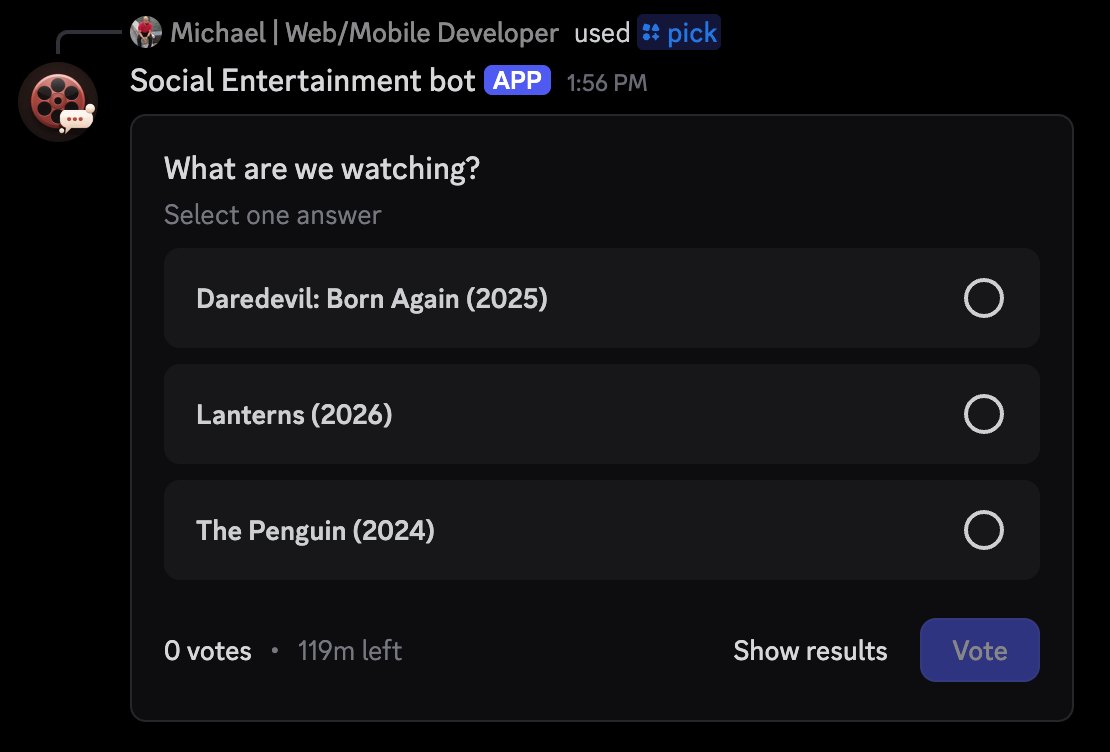
Wednesday: someone runs /pick with the candidates. Autocomplete fills in the right titles as you type, years included, so nobody votes for the wrong Daredevil. Discord's own poll appears, with a countdown and a Show results button. (If Lanterns wins, I have episode explainers waiting.)
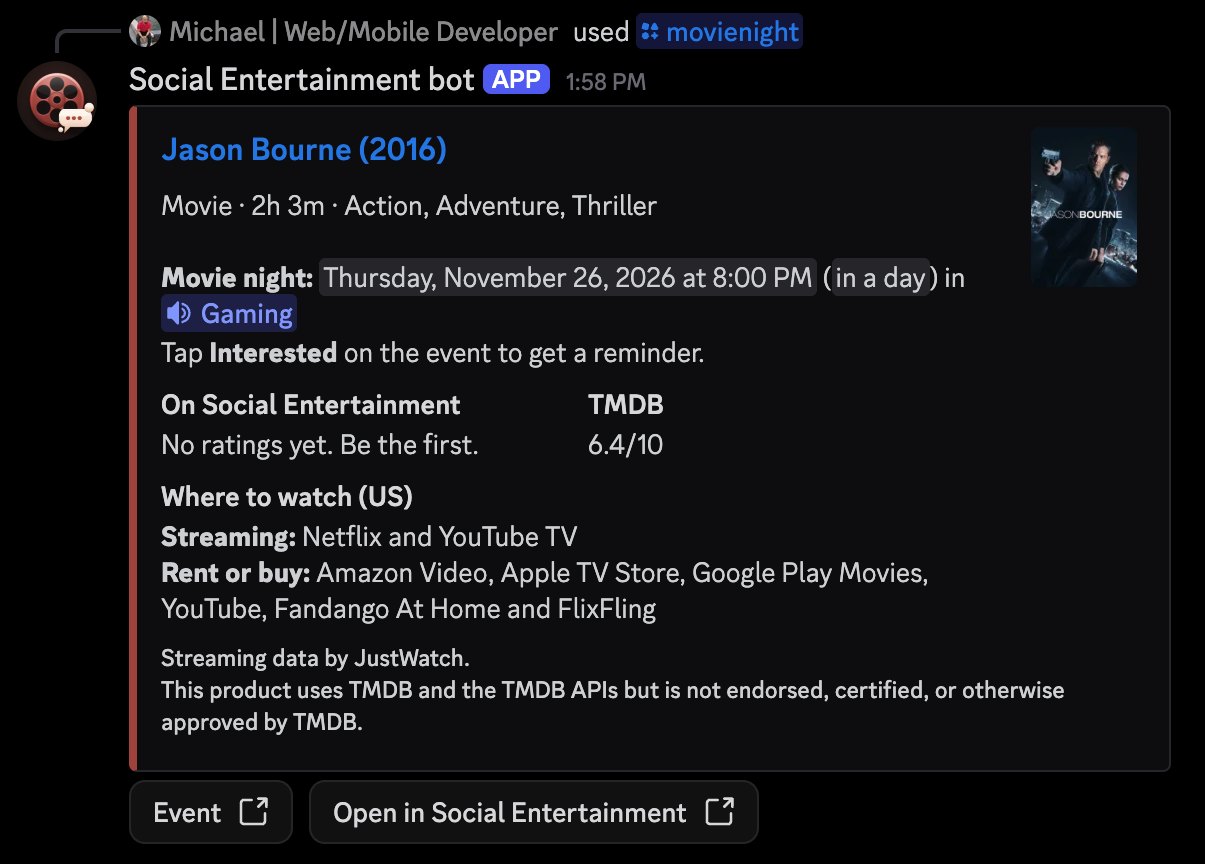
Thursday: the poll closes. A mod runs /movienight with the winner, a date, a start time and the voice channel you watch in. The bot creates the server event and posts a card with the start time shown in everyone's own time zone, a countdown, where to stream it, and an Event button that jumps straight to the RSVP.
Friday: everyone who tapped Interested gets Discord's reminder. You watch together however your server already does it, screen share or everyone pressing play at once.
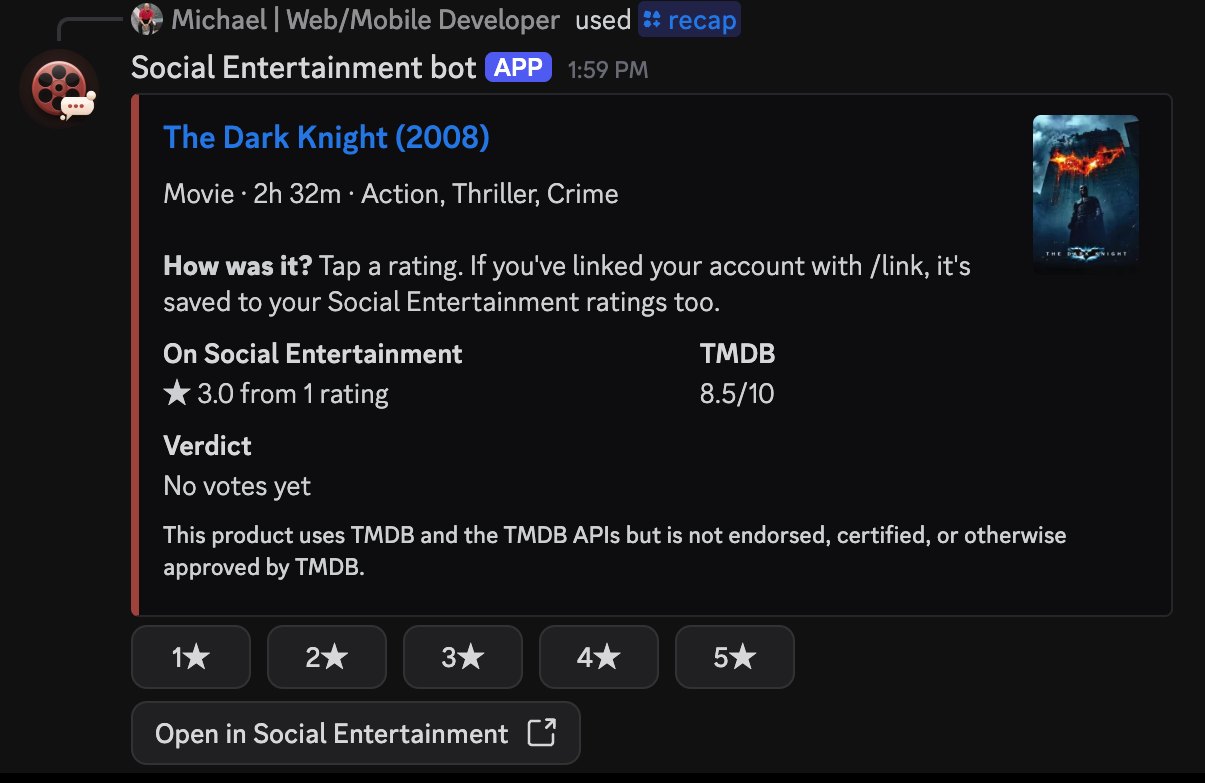
After the credits: run /recap. Leave the title empty and it picks up the server's last movie night on its own. Everyone taps their stars, the Verdict line updates with the group average, and linked members find the rating already on their profile.
To be clear about what the bot is not: it does not stream the movie, and it never reads your server's chat. It only sees the commands people run and the buttons they press.
Quick answers
- Is it free? Yes. The bot, the app and linking are all free.
- Does everyone in the server need the app? No. Anyone can use the commands and vote on recap cards. Only people who want their ratings saved need an account.
- Movies only? No. /title, /pick and /recap all work for TV shows too, so a season finale night works the same way.
- Can I use it in DMs? Yes, once it is added to your account: /title, /pick and /recap work in DMs and group chats. /movienight needs a server, since it creates a server event.
- Where do the ratings and streaming data come from? Ratings come from Social Entertainment members. Streaming info comes from JustWatch and movie data from TMDB, and both are credited on the cards.
New to Social Entertainment? It is a free app for tracking and talking about movies and TV: a swipeable feed with trailers, ratings, reviews, lists, friends to follow and a comment thread for every episode. If you came from TV Time, I wrote up how it compares to the other Letterboxd-style apps for TV.